Edspark
×

Contact Us

Email Us

support@edspark.in

Response within 12-24 hours

Phone Number

+91 80734 56277

Available Mon-Sat, 9 AM - 8 PM IST

```

CAD

Auto CAD Workshop

Edspark Workshops | Cosmic Learning Experience
Edspark Workshop
Transforming Education into Careers

Kickstart Your Journey with Edspark Workshops

Learn from experts, gain hands-on experience, and build skills that open real career opportunities.

Edspark Workshops are designed to make you job-ready through practical learning, live mentorship, and industry certification. Whether you’re a student or a professional, our career-focused skill programs help you grow faster and smarter in today’s evolving industries.

Be part of Skill India Partner Courses and gain skills that truly make a difference. Learn. Grow. Excel with Edspark.

Lifetime Access to Updated Course Materials
Live Mentorship from Industry Experts Working in MAANG Companies
Verified Workshop & Training Completion Certificates
20+ Hours of Interactive, Instructor-Led Sessions
Hands-On Experience with Real-World Projects
Access to Internship & Certification Opportunities Post-Workshop

Key Highlights

We are proud to present the success of our Program

130+

Mentees Placed

11.5LPA

Highest CTC

80.3%

Placement Rate

50+

Hiring Partners

Fill out the form to join the Workshop!

Edspark Services
Workshop

Real-world projects, mentor guidance, and feedback to boost employability and practical skills.

Training

Structured workshop training by experienced mentors, covering basics to advanced tactics in multiple learning modes.

Placement Assistance

Aptitude, personality development, mock interviews, LinkedIn building, and HR preparation for job success.

Accreditation Badges
We are accredited by
Google for Education
NSDC
Skill India
Media & Entertainment Skills Council
NSR CEL
Hiring Heroes
Get Hired by Top Brands – Backed by 50+ Hiring Partners
lesken
Vyapar
Capgemini
Simpllearn
PagarBook
MoneyTap
Urban Piper
Airmeet
lesken
lesken
Vyapar
Simpllearn
PagarBook
MoneyTap
Urban Piper
LeapFinance
AJIO
Kapiva
GlobalLogic
EatFit
smallcase
ShareChat
LeapFinance
LeapFinance
LeapFinance
AJIO
Kapiva
GlobalLogic
EatFit
smallcase
BharatAgri
ShareChat
LeapFinance
LeapFinance
HomeLane
Swiggy
NoBroker
Jio
Pine Labs
Hogarth Studios
Cleartrip
NoBroker
NoBroker
NoBroker
NoBroker
NoBroker
Jio
Pine Labs
Hogarth Studios
HomeLane
Swiggy
workshop

Our Work Shop Modules

What CAD is and how it is used in engineering and design.

Understanding the AutoCAD workspace, ribbon, command line and drawing area.

Opening, saving and managing DWG files.

Setting units, limits and drawing templates.

Using line, circle, arc, rectangle, polygon and ellipse commands.

Creating accurate shapes with coordinate input.

Using construction lines and reference geometry.

Practicing simple 2D drawing exercises.

Using grid, snap and ortho mode.

Working with object snaps such as endpoint, midpoint, center and tangent.

Using polar tracking and object snap tracking.

Improving accuracy while drafting.

Using move, copy, rotate and scale commands.

Editing drawings with trim, extend, offset and mirror.

Using fillet and chamfer for clean corners.

Practicing common editing workflows.

Creating and managing layers.

Changing colors, line types and line weights.

Locking, freezing and hiding layers.

Organizing drawings neatly with layer standards.

Adding single-line and multi-line text.

Creating dimension styles.

Adding linear, aligned, angular and radius dimensions.

Using annotations to make drawings clear and readable.

Applying hatch patterns to closed areas.

Editing hatch scale, angle and boundaries.

Using gradients and solid fills where needed.

Adding details to improve drawing presentation.

Creating simple blocks.

Inserting and scaling blocks.

Editing existing blocks.

Using reusable symbols to save drafting time.

Understanding model space and paper space.

Creating layouts for drawing sheets.

Setting viewport scale.

Preparing drawings with title blocks.

Setting paper size and print orientation.

Choosing plot area and drawing scale.

Using plot styles and line weights.

Exporting drawings as PDF files.

Understanding the 3D workspace.

Creating simple 3D objects using extrude and presspull.

Using 3D view controls.

Viewing models in isometric and visual styles.

Using revolve, sweep and loft commands.

Editing solids with union, subtract and intersect.

Moving and rotating objects in 3D space.

Creating simple 3D practice models.

Creating simple mechanical part drawings.

Understanding orthographic views.

Creating isometric views.

Adding dimensions and notes to mechanical drawings.

Creating simple floor plan layouts.

Adding walls, doors, windows and room labels.

Using layers for architectural drawings.

Preparing clean 2D plan drawings.

Understanding commonly used electrical symbols.

Creating simple wiring layouts.

Using layers for electrical drawings.

Preparing readable electrical CAD diagrams.

Creating a complete 2D drawing from scratch.

Applying layers, dimensions, hatch and annotations.

Preparing the drawing layout for print.

Exporting the final drawing as a PDF.

Pricing Plans
Choose Your Perfect Plan
Unlock your learning potential with Edspark!

Recorded Kit

₹7,999
Projects + IBM Certification
Doubt Clear Sessions
Recorded Sessions
Expect Class
Hands-on Projects
Most Popular

Skill Booster Kit

₹9,999
Recorded Sessions
Hands-on Projects
Live Sessions
1:1 Mentoring
Doubt Sessions
Mentor Guidance

Placement Booster Kit

₹15,999
Recorded Sessions
Hands-on Projects
Mentor Guidance
Live Sessions
Job Accelerator
Interview Mastery
Workplace Success
Expert mentors

Learn from people who build, lead, and mentor in the real world.

Our mentors bring industry experience into every session, helping learners connect concepts with projects, interviews, and workplace expectations.

30+years combined
1:1guided support
4+ yrs Riya Singal AI and data mentoring

Riya Singal

Works at Google Google
4+ yrs Kunika Malhotra Cloud and career guidance

Kunika Malhotra

Works at Amazon Amazon
3+ yrs Alyna Fathima Full-stack project coaching

Alyna Fathima

Worked at RSR RSR
19+ yrs Surjya Narayan Sahoo Enterprise technology leadership

Surjya Narayan Sahoo

Worked at Industry leader Industry leader
3+ yrs Nagendra Singh Digital systems and deployment

Nagendra Singh

Works at Jio Jio
15+ yrs Prerna Singh Strategy and learner success

Prerna Singh

Worked at Enterprise mentor Enterprise mentor
Student Differentiation
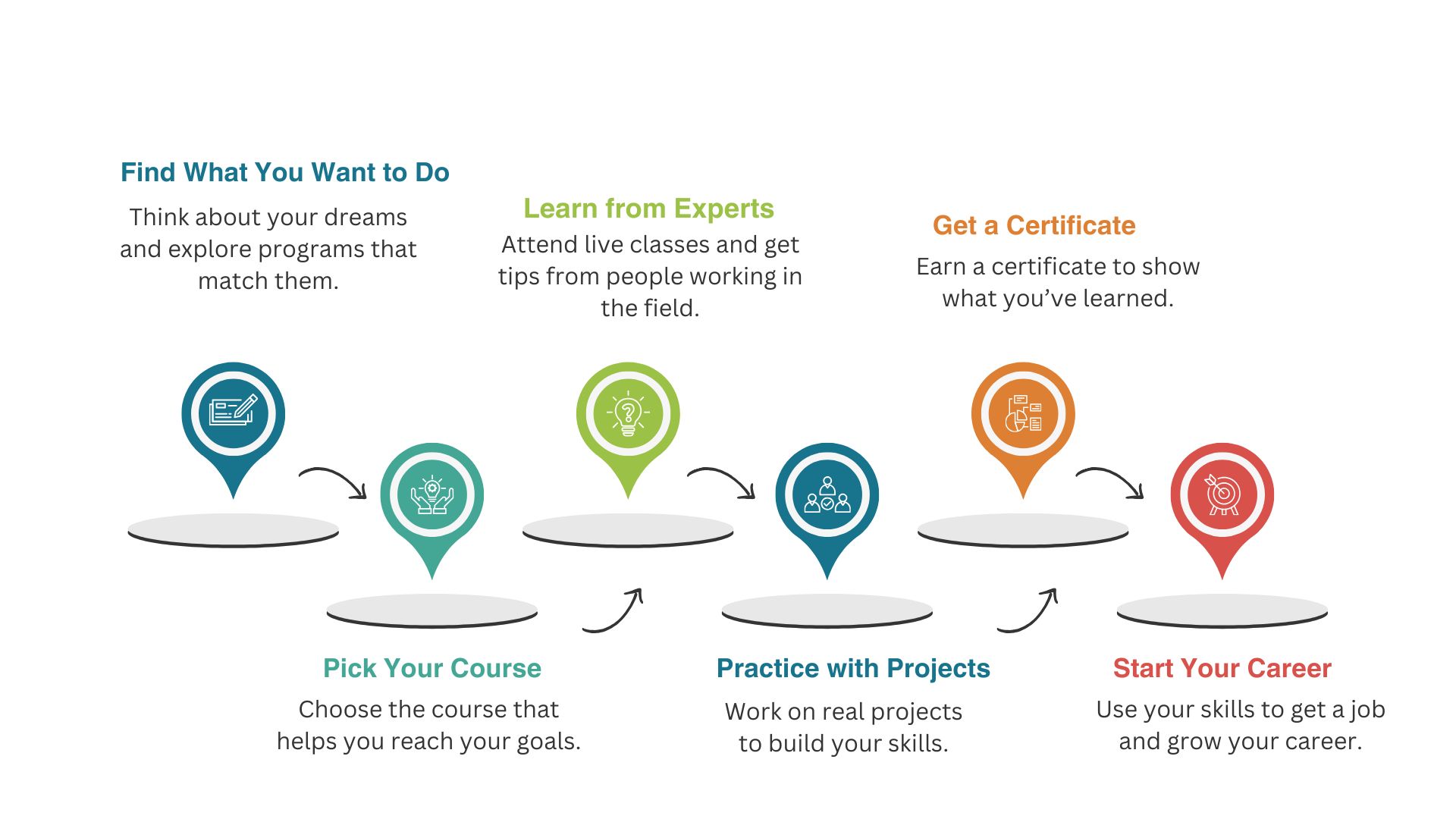
Start Your Growth Journey with Edspark
Take the first step with Edspark — explore cutting-edge courses and expert mentorship designed to shape your career.
Flow Diagram

Our Students Said

Tushar Sohal

Tushar Sohal

Artificial Intelligence

The AI workshop helped me understand core concepts, practical use cases, and project thinking. It was a clear, hands-on learning experience with Edspark.

Tiyasa Saha

Tiyasa Saha

Machine Learning

I built a customer churn prediction model and learned data cleaning, analysis, and model evaluation using Python. The workshop made ML feel practical.

Tanisha

Tanisha

Artificial Intelligence

The Titanic survival project strengthened my understanding of preprocessing, feature engineering, model training, and evaluation in a simple way.

Soumli

Soumli

AI & Machine Learning

Edspark made AI and ML concepts easier to apply through Python-based practice. The sessions gave me confidence to work on real problems.

Ditsa

Ditsa

Digital Marketing with GenAI

The workshop showed how GenAI supports content, campaigns, audience research, and strategy. It was practical, creative, and useful.

Ditsa Basu

Ditsa Basu

Cyber Security with GenAI

I learned modern cybersecurity basics and how GenAI can support threat understanding, security analysis, and smarter digital practices.

Ashutosh Yadav

Ashutosh Yadav

Cloud Computing

The cloud workshop explained infrastructure, deployment, and scalable applications clearly. The practical approach made the concepts easier.